10 Surprising Facts About Running a Server GPU on Your PC for Local AI
If you’ve been dreaming of running powerful AI models at home without breaking the bank, a hidden gem in the GPU world might be your ticket. Enthusiasts have discovered that an enterprise-grade Nvidia V100, originally designed for server racks, can be adapted to a standard PC for a fraction of the cost. But this opportunity won’t last forever. Here are ten eye-opening facts about this quirky hardware hack that could save you hundreds—if you act fast.
1. The Arbitrage Opportunity: A $100 V100
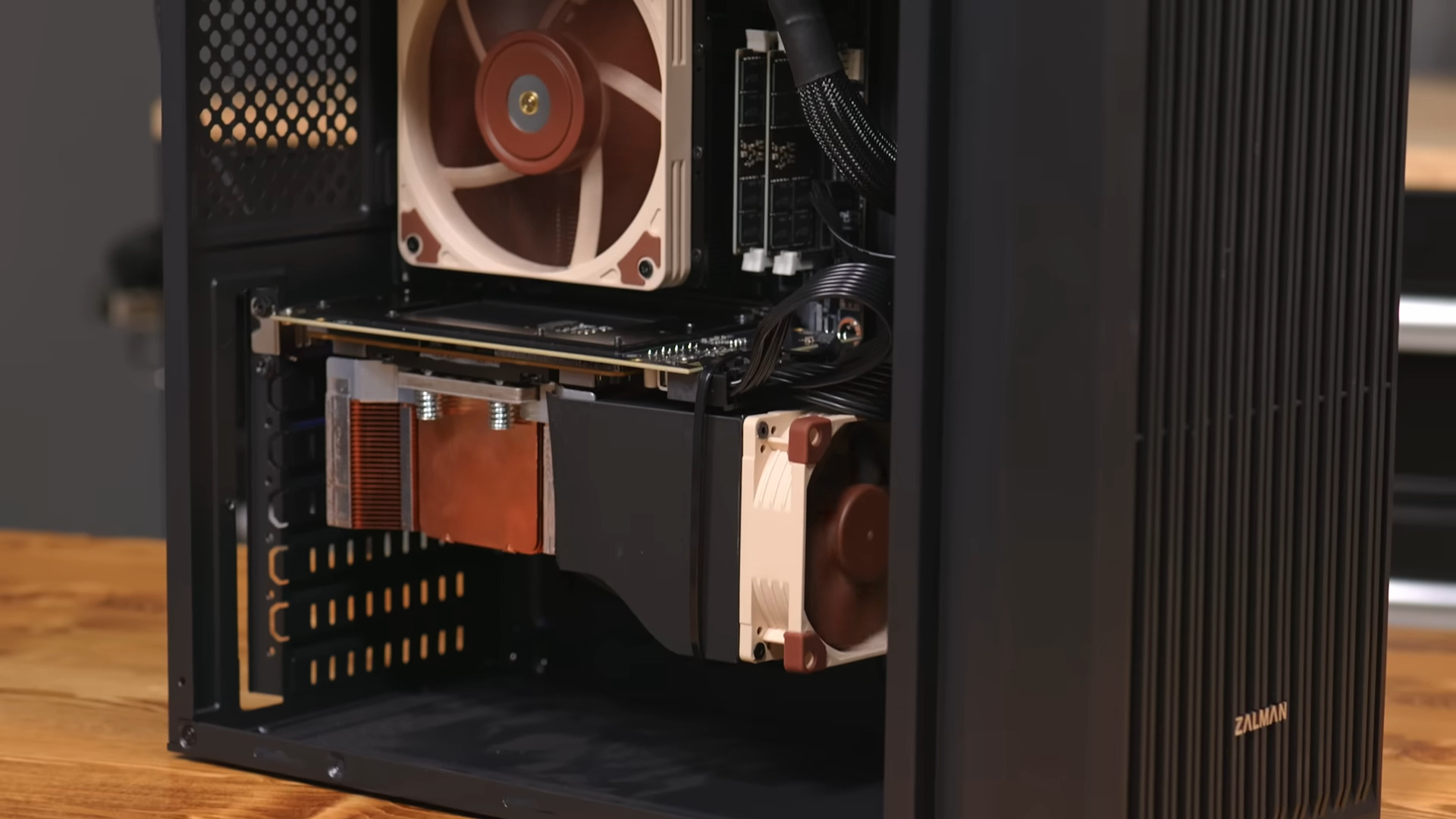
Hardware Haven snagged a 16 GB Nvidia V100 for just around $100. Normally, the PCIe version of this card costs over a thousand dollars. The catch? This V100 uses an SXM2 socket, a server-only interface that doesn’t fit standard motherboards. Because most consumers can’t plug it in directly, sellers offload them cheaply. It’s a classic market gap, but as word spreads, prices will climb. For now, if you’re willing to tinker, you can grab a high-performance GPU at a steal.
2. SXM2 vs. PCIe: The Compatibility Conundrum
The V100 comes in two flavors: SXM2 (server module) and PCIe. SXM2 cards are designed for proprietary server motherboards with matching sockets. They’re smaller and more power-dense but incompatible with consumer slots. That’s why they’re often sold cheaply—they’re essentially orphaned parts. In contrast, the PCIe variant plugs into any standard slot but commands a premium. Understanding this difference is key to exploiting the price gap.
3. The Adapter Board: Second Hundred Well Spent
To make the SXM2 V100 work in a regular PC, you need an adapter board that converts the proprietary socket to PCIe. Hardware Haven paid another $100 for one. This board handles power delivery and signal routing, effectively turning a server GPU into a desktop component. While it adds to the total cost, the combined $200 is still far less than the $1,000+ PCIe version. It’s a small investment for massive savings.
4. Cooling Challenges: 3D Printing to the Rescue
Server GPUs are designed for high airflow environments with powerful fans. Placed inside a typical PC case, the V100 can overheat quickly. Hardware Haven 3D printed a custom fan shroud to direct airflow over the heatsinks. This DIY fix keeps temperatures in check without breaking the bank. If you replicate this build, be prepared for some light fabrication—or buy a pre-made shroud from online marketplaces.
5. Performance Showdown: V100 vs. RTX 3060
In head-to-head benchmarks against an RTX 3060 12 GB, the older V100 delivered more tokens per second when running language models. It also showed slightly higher efficiency during active tasks. This is impressive given the V100’s 2017 vintage. However, the RTX 3060 draws less power at idle, making it more suitable for always-on setups. The V100 shines when you’re actively running models, but not when the system is sitting idle.
6. Idle Power Penalty: A Hidden Cost
The V100’s idle power consumption is notably higher than newer consumer GPUs. While it’s efficient during workload, it guzzles energy when not in use. If you plan to leave your AI server running 24/7, this could offset the initial savings over time. Consider using power management settings or shutting down the machine when not needed. It’s a trade-off: lower upfront cost but potentially higher electricity bills.
7. Age Doesn’t Hinder Modern AI
Released in 2017, the V100 is based on the Volta architecture. Despite being seven years old, it runs the latest open-source language models like LLaMA 2 and Mistral effectively. Thanks to its 16 GB of HBM2 memory and tensor cores, it handles large models that newer budget cards struggle with. The V100 proves that older enterprise hardware can still compete in the AI space, as long as drivers and CUDA support remain.
8. Time Sensitivity: Grab It While You Can
This pricing anomaly won’t last. As more people discover the trick, demand for SXM2 V100s and adapters will drive prices up. Already, sellers on eBay are adjusting. If you’re considering this route, act quickly. The window of opportunity is closing, and once the market corrects, the V100 will no longer be a budget alternative. Keep an eye on forums and auction sites for the best deals.
9. Software Simplicity: Easy Setup Options
Once the hardware is running, you’ll need software to harness its power. Tools like Ollama, LM Studio, or text-generation-webui simplify running models without complex configuration. These platforms support CUDA, so the V100 works out of the box. You can load up any open-weight model and start chatting within minutes. The hard part is the hardware; the software is now user-friendly.
10. Raspberry Pi Alternative: Not Always Necessary
You don’t actually need a powerful GPU to start with local AI. For smaller models, a Raspberry Pi can handle basic inference, albeit slowly. If patience is your virtue, you can dip your toes into self-hosting AI for under $100 with a Pi. But for serious performance with large models, the adapted V100 route is currently unbeatable in price-to-performance. Choose based on your needs and tolerance for latency.
Conclusion
The SXM2 V100 adapter hack is a brilliant way to democratize local AI. It takes some DIY spirit, but the savings are substantial. Keep in mind the cooling, power, and time constraints, and you could run powerful models at home without emptying your wallet. Just remember: this window won’t stay open long. If you’re ready to experiment, now is the moment to pounce.
Related Articles
- GPU Memory Attack Opens Door to Full System Takeover: New Rowhammer Variant Targets NVIDIA Ampere Cards
- The YouTube Lag Nightmare: 10 Critical Facts About the Infinite Loop Bug
- Understanding the Updated Baseline for Rust's nvptx64-nvidia-cuda Target
- AMD Ryzen 9850X3D Gaming Bundle Under $830: CPU, Motherboard, RAM & PSU
- 7 Game-Changing Features of Lian Li’s DK07 Wood Standing Desk Dual-PC Chassis
- 10 Critical Things You Need to Know About SPIFFE for Agentic AI Security
- Demystifying NVIDIA's Ising Open Models for Quantum Computing
- Huawei Poised to Dominate China's AI Chip Market by 2026 as Nvidia Faces Hurdles