How to Spot AI-Generated Images: A Guide to Using C2PA and SynthID
Introduction
In a world where AI can create stunningly realistic images, knowing what's real and what's generated by a machine is more important than ever. OpenAI has taken a big step forward by officially adopting the Coalition for Content Provenance and Authenticity (C2PA) open standard and partnering with Google's SynthID to embed an invisible watermark in images produced by its AI models. These two measures work together to give you, the viewer, a reliable way to verify whether an image was generated by an AI. This guide will walk you through exactly how to use these technologies to identify AI-generated images — from understanding the C2PA metadata to spotting the SynthID watermark. Whether you're a journalist, a social media user, or just curious, these steps will help you separate fact from algorithmic fiction.
What You Need
- An image you suspect may be AI-generated (any image from a source that might use OpenAI models, such as DALL·E, ChatGPT, or third-party tools).
- A device with internet access and a modern web browser (Chrome, Firefox, Edge, Safari).
- Optional but helpful: A C2PA-compatible browser extension or a metadata viewer (e.g., Content Authenticity Initiative tools, or simply right-click and inspect file properties).
- Optional: Access to OpenAI's verification tool or a SynthID detector (if available publicly).
Step-by-Step Guide
Step 1: Understand the Two Technologies
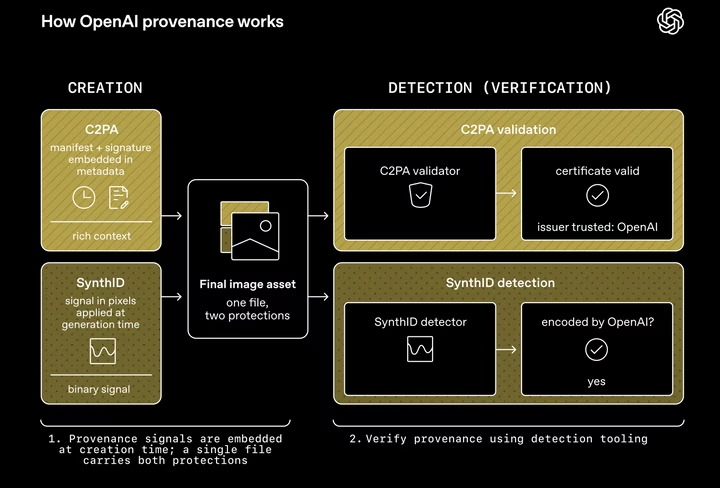
Before diving into detection, it helps to know what you're looking for. C2PA is an open standard that attaches tamper-evident metadata to an image — like a digital birth certificate. It can include details such as the model used, the date of creation, and any edits. SynthID, developed by Google DeepMind, is an invisible watermark added directly into the pixels of an image. Unlike a visible logo, SynthID is designed to survive cropping or compression and can be detected by a specialized algorithm. OpenAI embeds both: C2PA metadata in the file and SynthID in the pixel data.
Step 2: Check for C2PA Metadata
The quickest way to verify provenance is to inspect the image's metadata. Right-click the image file on your computer (or use an online tool) and look for fields like Content Credentials or Provenance. Here's how:
- For local files: On Windows, right-click the image, select Properties > Details. On macOS, open the image in Preview, go to Tools > Show Inspector, then click the More Info tab (look for EXIF or XMP data).
- For images on websites: Use a C2PA verification browser extension (like the one from the Content Authenticity Initiative). Install it, then click the extension icon when viewing an image. It will show you if C2PA data exists and what it says.
- Online tools: Websites like verify.contentauthenticity.org let you upload an image and inspect its provenance. Make sure the tool supports C2PA standard.
If you see entries like ai.generator or openai.com and a timestamp, the image likely originated from an OpenAI model. Note that C2PA metadata can be stripped — so a missing tag doesn't guarantee it's human-made.
Step 3: Detect the SynthID Watermark
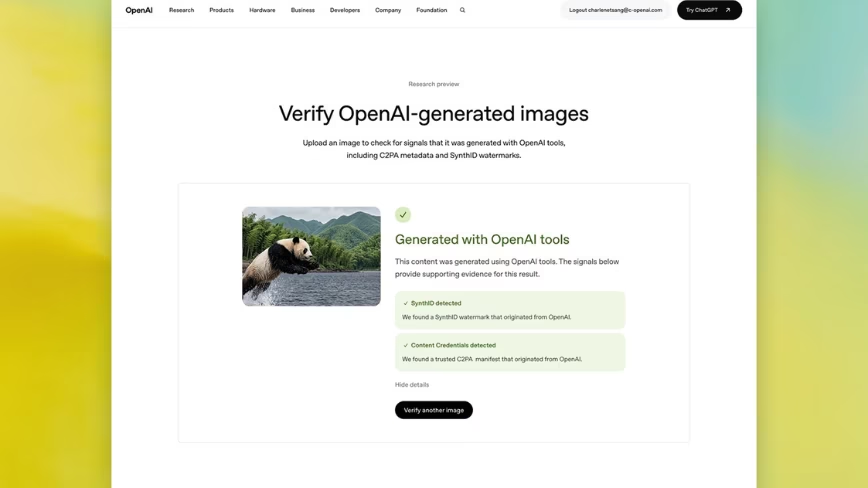
SynthID is invisible to the naked eye, so you need a detector. OpenAI plans to provide a public tool (check their official site or blog for updates). Google also offers a SynthID detection API for developers. As of now, here's a practical approach:
- Use an official detection tool: Visit openai.com/research/identifying-ai-generated-content (this URL may change; search for "OpenAI SynthID detector"). Upload the image. The tool will return a confidence score indicating how likely the image carries a SynthID watermark.
- Check third-party implementations: Some browsers and apps (like Google Photos or Chrome extensions) may integrate SynthID detection. Look for options like "Check for AI mark" in the right-click menu.
- Analyze pixel patterns: If you're technical, you can run a script that looks for the unique frequency-based pattern SynthID embeds. However, this is advanced and error-prone — stick to official tools for reliability.
Remember: SynthID is designed to be robust, but it's not foolproof. Heavy editing or extreme compression might remove it.
Step 4: Combine Both Checks
For maximum confidence, perform Step 2 (metadata) and Step 3 (watermark) on the same image. A positive result from both strongly indicates an AI-generated image from OpenAI. If only one matches, the image may still be AI-generated but from a different model, or the other marker was altered. Use your judgment and consider other context clues (strange lighting, impossible objects, inconsistent shadows).
Step 5: Understand Limitations
No detection method is perfect. C2PA metadata can be removed by saving the image as a different format or re-uploading via platforms that strip metadata (like many social media sites). SynthID can be weakened by aggressive filters. Additionally, other AI image generators (like Midjourney or Stable Diffusion) are not required to use these standards — they may have their own or none at all. Always treat results as probabilistic, not absolute.
Step 6: Stay Updated
Both technologies are evolving. Follow OpenAI's official blog and the C2PA website for updates on detection tools. Browser extensions and operating systems may add native support, making checks as easy as a right-click.
Tips and Final Thoughts
- Use multiple indicators: Don't rely solely on metadata or watermarks. Combine with visual inspection and reverse image search for context.
- Beware of false positives: An old photo edited with AI filters might carry C2PA data from the edit tool. Always check the full provenance chain.
- Educate others: Share this guide with friends, colleagues, or students. The more people know how to verify images, the harder it becomes to spread misinformation.
- Support the standards: Encourage other AI developers to adopt C2PA and SynthID. Broad adoption will make verification much simpler.
- Respect privacy: Some images may have C2PA data that reveals sensitive details (e.g., location). Use checking tools that don't upload your images to external servers unless necessary.
OpenAI's move to adopt C2PA and embed SynthID is a powerful step toward transparency. By following this guide, you can become a more informed consumer of digital imagery. Remember: the goal isn't to distrust every image, but to have the tools to ask the right questions. As AI continues to evolve, so will our ability to detect it — and that's a future worth working toward.
Related Articles
- Revolutionizing Design Workflows: Batch Editing with Claude and Affinity
- Docker’s AI Agent Fleet: How We Built a Virtual Team to Ship Faster
- How to Use GitHub Spec-Kit for Spec-Driven Development with AI Coding Agents: A Step-by-Step Guide
- New Algorithms Crack the Scalability Barrier in AI Interpretability: Identifying Critical LLM Interactions
- Understanding TOP 11 AI MARKETING TOOLS YOU SHOULD USE (Updated 2022)
- Health Tech Titans Diverge: Google's AI Coach vs. Whoop's Human Doctors
- OpenAI's ChatGPT Banking Integration: Convenience Versus Privacy Risks
- OpenAI Unveils Specialized Voice AI Models: Real-Time Reasoning, Translation, and Transcription